Bubup Kids Store Baby Shop
Overview
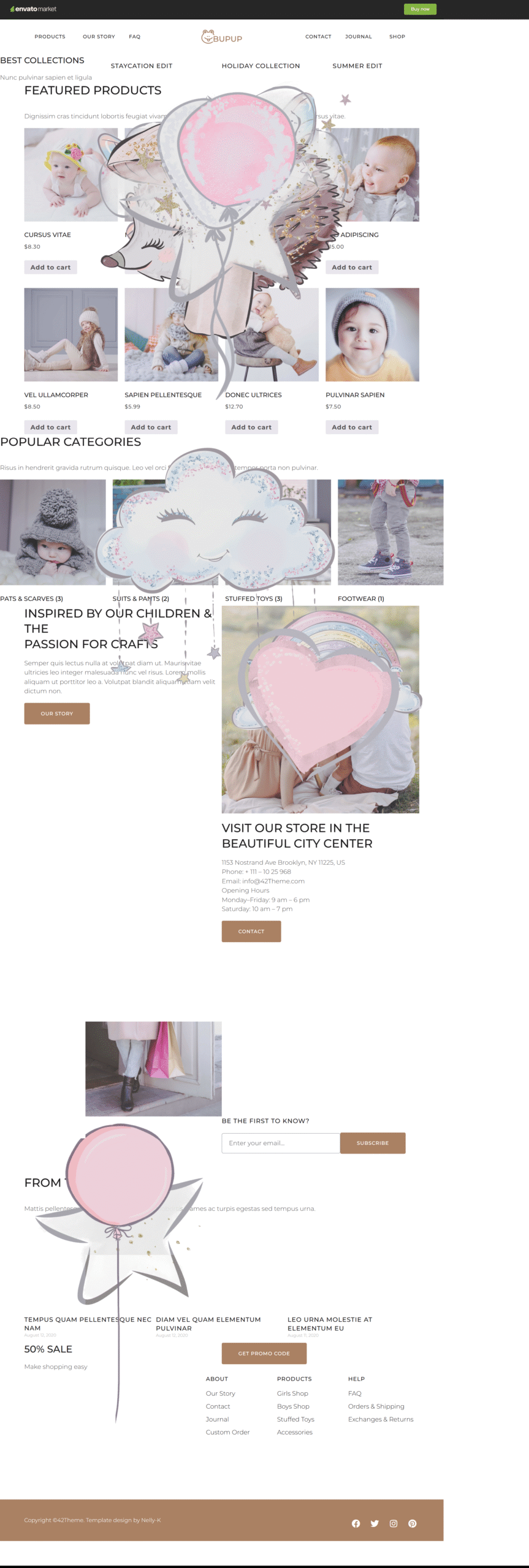
Bubup Elementor Template Kit is a complete shop-builder solution designed for children’s clothing, baby products, and toy stores. Fully compatible with WooCommerce, Bubup integrates seamlessly with your existing online shop and is ready to use right out of the box.
Built with Elementor and Elementor Pro, Bubup dynamically pulls product data directly from your WooCommerce store. Product listing pages and single product layouts are automatically populated, allowing you to focus on design and content rather than technical setup.
Bubup is crafted specifically for kids and baby shops that require a reliable, visually appealing, and high-converting website. With just a few clicks, you can customize colors, images, fonts, and content to suit any type of baby or children’s product, making your store market-ready in minutes.
The template is fully responsive and performs flawlessly across all devices, including desktops, laptops, tablets, and mobile phones.
Getting started is incredibly easy—simply install the template kit, choose a page, and start editing with Elementor. No additional WordPress configuration is required.
Bubup offers a true zero-coding experience. All styles, animations, and effects are managed directly within the Elementor panel, making customization fast and intuitive.
Key Highlights
- No coding required
- Global theme styles for easy site-wide customization
- Fully functional forms
- Optimized performance and SEO-friendly structure
Please don’t forget to rate the template if you enjoy using it!
Features
- 13 Flexible Page Layouts
- 24 Unique Section Templates
- Clean and Modern Design
- Fully Responsive (Desktop, Laptop & Mobile)
- Styled for All Major WordPress Widgets
- Well-Organized Layers
- Easy to Customize
- 100% Fluid Responsive Layout
- SEO-Friendly Structure
- Free Google Fonts
- Cross-Browser Compatibility (Firefox, Chrome, Safari, Opera)
Required Plugins
- Elementor
- Elementor Pro (not included, must be purchased separately)
- WooCommerce
Included Pages
- Home
- Our Story
- FAQ
- Custom Order
- Products
- Single Product
- Journal
- Single Post
- Contact
- Cart
- Checkout
- My Account
- 404 Page
Content Sections
- Header
- Footer
- Hero Image
- Featured Products
- Categories
- Collections
- Sale Section
- From the Journal
- Subscribe
- Contact
- Our Story
- Values
- FAQ Sections
- Stores
- Map & Address
- Workshop & Manufacture
- Visit Us
- Call to Action Sections
FAQs
1. Do I need coding skills to use Bubup?
No. Bubup is built entirely with Elementor, allowing you to customize everything visually without writing any code.
2. Is Elementor Pro required?
Yes. Some templates and features require Elementor Pro, which must be purchased separately.
3. Can I use Bubup with my existing WooCommerce store?
Absolutely. Bubup integrates seamlessly with existing WooCommerce shops and automatically displays your products.
4. Is the template mobile-friendly?
Yes. Bubup is fully responsive and optimized for desktops, tablets, and mobile devices.
5. I don’t have Elementor Pro — how can I use this template kit?
If you don’t have Elementor Pro and some sections require Pro widgets, you can use the ProElements project as an alternative. You can download it directly from here https://proelements.org
Installation Instructions
- Download: Click the download button above to get the .zip file.
- Import: In your WordPress Dashboard, go to Elementor > Tools > Import/Export Kit.
- Upload: Select the .zip file and follow the prompts to apply the design to your site.