Eshikkha Elearning
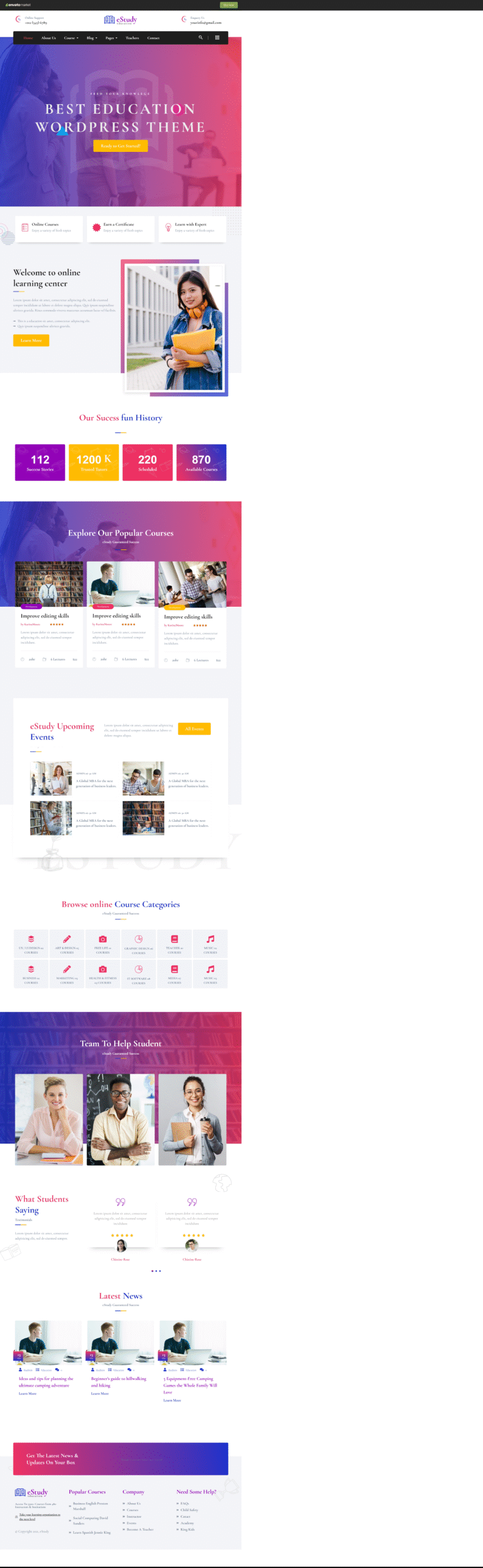
Overview
EShikkha is a modern and flexible Elementor Template Kit designed to help you build professional education, eLearning, coaching, or course-based websites quickly and effortlessly. Built exclusively for WordPress with Elementor Page Builder, eShikkha allows you to create stunning pages without writing a single line of code.
The template kit is fully optimized for the free Hello Elementor theme, but it also works smoothly with most WordPress themes that support Elementor.
Key Features of eShikkha Template Kit
- 100% No-Code Customization using Elementor’s drag-and-drop visual builder
- Centralized font & color controls with individual element customization options
- Modern and professional UI design suitable for education platforms
- Fast-loading and lightweight structure for better performance
- Compatible with most Elementor-supported WordPress themes
- Fully responsive design for desktop, tablet, and mobile devices
eShikkha includes ready-to-use pages and over 16 pre-designed sections, making it easy to launch your website faster.
Included Templates
Pages
- Home Page
- About Us Page
- Course Grid Page
- Course Detail Page
- Teachers Page
- Single Teacher Page
- Blog Page
- Blog Detail Page
- Contact Us Page
- Coming Soon Page
- 404 Error Page
Ready-Made Sections
- Header Section
- Header Top Section
- Footer Section
- Hero Section
- Welcome Section
- Fun Fact Section
- Course Categories Section
- Popular Courses Section
- Teachers Section
- Services Section
- Testimonials Section
- Blog Section
- Banner Section
- Newsletter Section
- Upcoming Events Section
- 404 Error Section
Required Plugins (Free Only)
No premium or paid plugins are required. All necessary plugins are 100% free and automatically installed with the kit.
- Elementor
- ElementsKit Lite
- Elementor – Header, Footer & Blocks
- Stax – Elementor Addons, Widgets & Enhancements
- PowerPack Lite for Elementor
- Contact Form 7
FAQs
1. What is eShikkha Elementor Template Kit?
eShikkha is a pre-designed Elementor Template Kit for WordPress that helps you create education, eLearning, and course websites quickly using the Elementor Page Builder.
2. Do I need Elementor Pro to use eShikkha?
No. eShikkha works perfectly with free Elementor and does not require Elementor Pro or any premium plugins.
3. Which theme works best with eShikkha?
The template kit is optimized for the Hello Elementor theme, but it also works with most WordPress themes that support Elementor.
4. Can I customize fonts, colors, and layouts?
Yes. You can fully customize fonts, colors, layouts, and sections using Elementor’s drag-and-drop editor—no coding needed.
5. I don’t have Elementor Pro — how can I use this template kit?
If you don’t have Elementor Pro and some sections require Pro widgets, you can use the ProElements project as an alternative. You can download it directly from here https://proelements.org
Installation Instructions
- Download: Click the download button above to get the .zip file.
- Import: In your WordPress Dashboard, go to Elementor > Tools > Import/Export Kit.
- Upload: Select the .zip file and follow the prompts to apply the design to your site.