Fintec Finance Business Company
Overview
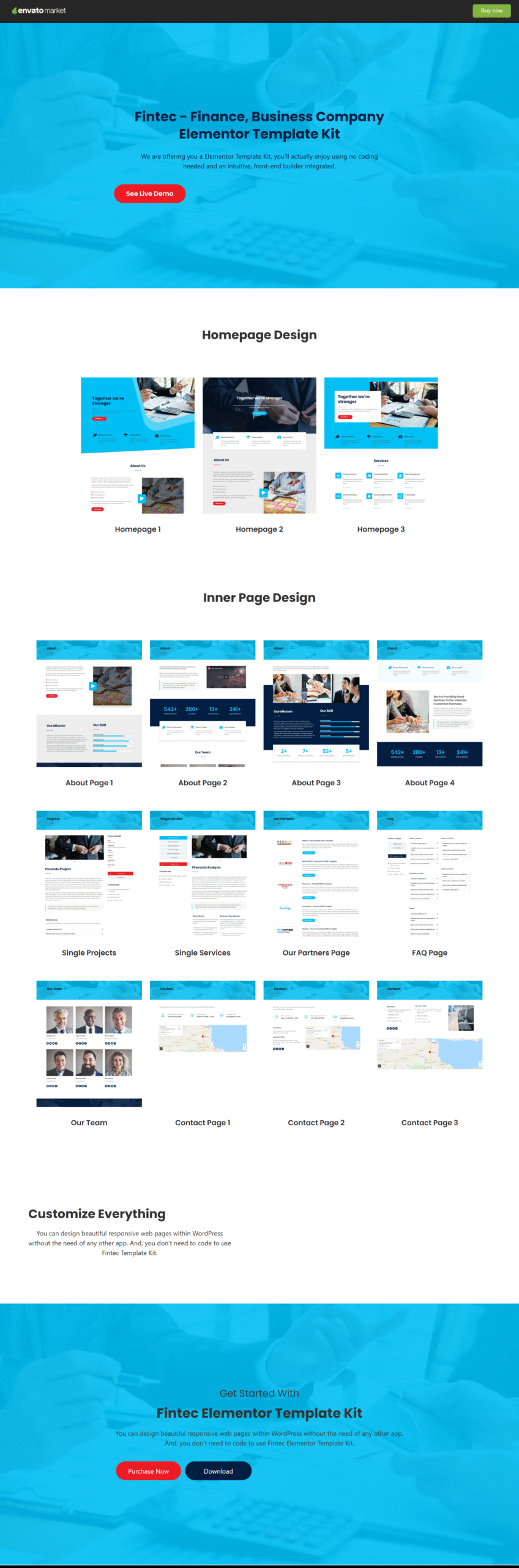
Fintec is a modern and versatile Finance & Business Elementor Template Kit designed for financial services, corporate websites, startups, and multipurpose business solutions. Featuring a clean, professional, and unique design, Fintec helps you establish a strong and trustworthy online presence.
The template kit is fully responsive and has been carefully tested across all major devices and screen sizes to ensure a seamless user experience. Built exclusively for the Elementor Page Builder, Fintec allows you to customize every layout easily using a visual drag-and-drop editor—no coding required.
With over 38 beautifully designed layouts, including complete pages and reusable blocks, Fintec provides everything you need to build a professional business website quickly and efficiently.
What’s Included
Page Layouts
- 3 Homepage Designs
- 4 About Page Designs
- Our Team Page
- Our Partners Page
- FAQ Page
- 3 Contact Page Layouts
- Single Service Page
- Single Project Page
Blocks & Sections
- FAQ Tab Section
- Contact Form
- Team Block
- Gallery Block
- Call-to-Action Section
- Statistics Section
- And many more reusable blocks
Key Highlights
- Designed for finance, corporate, and multipurpose businesses
- Clean, professional, and modern design
- 100% responsive and mobile-friendly
- Over 38 visual layouts (16+ pages, 22+ blocks)
- Easy customization with Elementor’s drag-and-drop editor
- Built for speed, usability, and flexibility
FAQs
1. What is Fintec?
Fintec is an Elementor Template Kit designed for finance companies, corporate businesses, startups, and multipurpose business websites.
2. How many layouts are included?
The kit includes over 38 layouts, consisting of 16+ full page designs and 22+ reusable block templates.
3. Is Fintec mobile-friendly?
Yes. Fintec is fully responsive and tested on all major devices and screen sizes.
4. Do I need coding knowledge to use this template kit?
No coding is required. All layouts can be customized using Elementor’s visual drag-and-drop editor.
5. I don’t have Elementor Pro — how can I use this template kit?
If you don’t have Elementor Pro and some sections require Pro widgets, you can use the ProElements project as an alternative. You can download it directly from here https://proelements.org
Installation Instructions
- Download: Click the download button above to get the .zip file.
- Import: In your WordPress Dashboard, go to Elementor > Tools > Import/Export Kit.
- Upload: Select the .zip file and follow the prompts to apply the design to your site.