Foodzey Restaurant
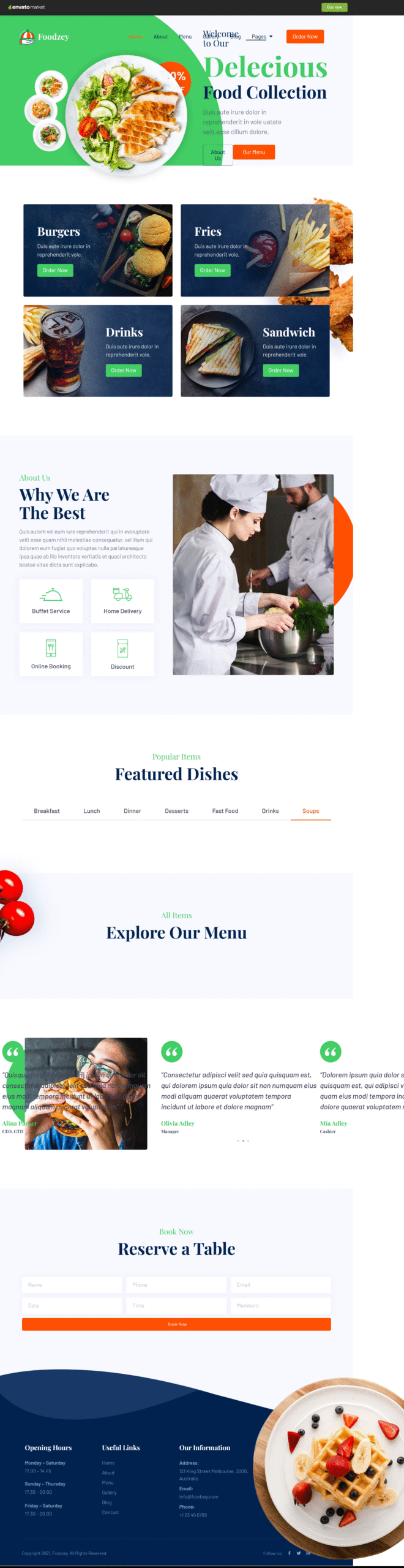
Overview
Foodzey is a premium Elementor Template Kit designed to help you build professional WordPress websites quickly and effortlessly—without writing a single line of code. Built specifically for the Elementor Page Builder, Foodzey delivers a modern, clean design ideal for food businesses, restaurants, and online stores.
The kit is fully optimized for the free Hello Elementor theme but works seamlessly with most WordPress themes that support Elementor. With drag-and-drop customization, centralized style controls, and fast-loading layouts, Foodzey makes website creation simple and efficient.
Key Features
- True no-code website building with a visual drag-and-drop editor
- Global font and color controls with per-element customization options
- Modern, professional, and conversion-focused design
- Optimized for speed and performance
- Compatible with most Elementor-supported WordPress themes
What’s Included
- 14 professionally designed templates
- Header and footer layouts
Required Plugins (Included)
- Elementor
- Essential Addons for Elementor
- WooCommerce
Note: Some templates and advanced features require an Elementor Pro upgrade (not included).
FAQs
1. What is Foodzey?
Foodzey is an Elementor Template Kit for WordPress that allows you to create professional food and business websites using the Elementor Page Builder—no coding required.
2. Do I need Elementor Pro to use Foodzey?
Elementor Pro is not required for basic use. However, some templates and advanced features do require an Elementor Pro upgrade.
3. Which theme works best with Foodzey?
Foodzey is optimized for the free Hello Elementor theme but is compatible with most WordPress themes that support Elementor.
4. Is WooCommerce required?
WooCommerce is required if you plan to use the shop or product-related templates included in the kit.
5. I don’t have Elementor Pro — how can I use this template kit?
If you don’t have Elementor Pro and some sections require Pro widgets, you can use the ProElements project as an alternative. You can download it directly from here https://proelements.org
Installation Instructions
- Download: Click the download button above to get the .zip file.
- Import: In your WordPress Dashboard, go to Elementor > Tools > Import/Export Kit.
- Upload: Select the .zip file and follow the prompts to apply the design to your site.