Fudo Real Estate
Overview
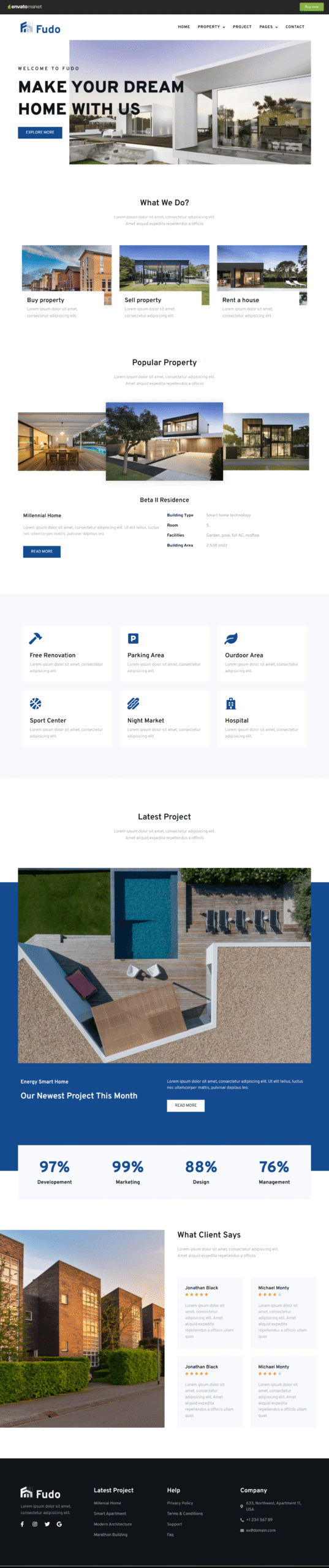
Fudo is a versatile and powerful solution designed for real estate agents, property businesses, and related industries. It features a sleek, contemporary design with a modern layout that enhances user experience and visual appeal. Built for flexibility, Fudo is easy to customize, allowing you to create a professional real estate website that matches your brand identity effortlessly.
Included Templates
- Home
- Property Listings
- Property Details
- Projects
- About Us
- Features
- FAQ
- Contact Us
- 404 Error Page
Layout Sections
- Header
- Footer
Required Plugins (Included with the Kit)
- Awesome Contact Form7 for Elementor
- Contact Form 7
- Elementor
- Elementor – Header, Footer & Blocks
- Element Pact Lite – Addon for Elementor
Frequently Asked Questions (FAQ)
1. What type of businesses is Fudo best suited for?
Fudo is perfect for real estate agents, property consultants, real estate agencies, property developers, and businesses involved in buying, selling, or renting properties.
2. Can Fudo be used for both residential and commercial properties?
Yes, Fudo is designed to showcase residential, commercial, and mixed-use property listings, making it suitable for a wide range of real estate businesses.
3. What makes Fudo different from other real estate templates?
Fudo stands out with its modern, clean design, well-structured property layouts, and flexible customization options that help create a professional and engaging real estate website.
4. Does Fudo support professional branding and design consistency?
Absolutely. Fudo allows you to customize layouts, typography, and colors easily, ensuring your website maintains a consistent and professional brand identity.
5. I don’t have Elementor Pro — how can I use this template kit?
If you don’t have Elementor Pro and some sections require Pro widgets, you can use the ProElements project as an alternative. You can download it directly from here https://proelements.org
Installation Instructions
- Download: Click the download button above to get the .zip file.
- Import: In your WordPress Dashboard, go to Elementor > Tools > Import/Export Kit.
- Upload: Select the .zip file and follow the prompts to apply the design to your site.